moonstone

support

Playing it, updating it, looking after it

The stone's manual is a deck of playing cards: one card for each thing it does, drawn in the lights you'll see when you do it. Every card is here, and the sounds it ships with.

open the deck Manual Every card, how to play it, and the sounds it comes with. get the editor Editor Your stone on the screen, every control by name, and every update to it.

tutorials

first, tune Tune your guitar on the stone There's a tuner in it. Both feet, one tap.
The card: tune

1Tap both feet together

Press both footswitches at once and let go. A moment later the sound goes quiet and a faint green column breathes in the middle: the stone is listening.

2Play one string

The light sits where the note is: on the left if you're flat, on the right if you're sharp, red when you're a long way off. As you turn the peg it warms to orange and slides toward the middle, and close in it drifts back toward the middle, the way to turn: right to tune up, left to tune down. The slower it moves, the closer you are.

3Stop when it stops

When the light stands still in the middle it turns green, and every light glows green once. That's within half a cent. Let the note ring and the reading stays a moment so you can look down.

4Tap a foot to play

Either foot. Your sound comes back as you left it, without the echoes from before you tuned.

Tuning to something other than A = 440? REFERENCE in the editor's settings goes from 430 to 446.

new here? Just got your stone? Follow this tutorial Ten minutes, a guitar and an amp. Hear the nine sounds it's born with, then make a fuzz of your own and keep it.
The card: browse and load a preset

1The nine red presets

Bank 1 holds the nine sounds every stone comes with, van Gogh first. Browse it and all nine lights glow red.

  1. Stand on WARP, the right foot, and keep it down. The lights flood the colour of the bank you're on, with your preset brightest.
  2. Turn X until they're red. Red is bank 1.
  3. Turn Y to choose a preset.
  4. Lift your foot. That preset loads. Play it.
  5. Again for the next one: van Gogh, Pompeii, Tranquility, Seattle, Svalbard, Wembley, Saudade, Woodstock and Monet.

Every preset is two sounds. Stand on MORPH and your foot glides from one to the other.

Or connect an expression pedal to the EXPR input with a TRS cable and rock it: heel is one sound, toe the other, anywhere between a blend. Expression is what moonstone is all about, so we really recommend one. The Dunlop DVP3 Volume (X) is a good pick: a volume pedal and an expression pedal in one.

The card: browse and load a preset

2A blank page in bank 2

Stand on WARP, turn X one click to bank 2 (the lights flood amber), and lift. An empty slot loads three empty rows: just your guitar.

The card: fuzz

3Choose fuzz

Stand on WARP and turn Z until the lights go orange: the drive sounds. Turn Y to step through them; each one plays a moment after you land on it. When you hear the fuzz, lift your foot. It's on your row now.

The back of fuzz's card: its nine controls

4Make it yours

Every knob turns three things. Turn it on its own for the first. For the other two, press another knob down and keep it pressed while you turn.

rowturn Xturn Yturn Z
aloneFUZZTONEMIX
holdYCIRCUITXBIASXLEVEL
holdZCLEANZOCTAVEYCHARACTER

So for CIRCUIT: press Y down, keep it there, and turn X. Fifteen fuzz circuits, one per click. For CLEAN: press Z and turn X. That's your guitar's volume knob as the fuzz feels it: roll it back and the fuzz cleans up, brighter, not duller. The nine lights are this grid while you turn, the one under your hand brightest.

The card: save with both feet

5Keep it

Stand on both feet. The lights show the slot you're on in bank 2; turn Y if you'd like a different one. Lift your feet, one or both, and it's saved, with a white flash to say so. Name it in the editor if you like. Fuzz names are the best names.

To come back to it any time, stand on WARP, turn X until the lights are amber and Y to your slot, then lift.

the rows Three sounds at once Each row of lights is a sound, top to bottom, and the guitar runs through all three.
The card: next row

1Move between rows

Press Y to go down a row, press X to go up. The row you land on flashes white, and the knobs now change that one.

The card: choose a sound

2A sound on another row

Go to the row, then stand on WARP, turn Z for the family and Y for the sound, and lift. A delay under the fuzz, a reverb under that: the first bank does it all the time. If the three together are more than the chip can carry, the stone shakes its head and keeps what you had.

The card: link rows

3Side by side, or one after another

Press X and Z together and let go. The flash tells you which way this row now feeds the next: both rows lit at once is side by side, one then the other is one after another.

The card: bypass a row

4Rest a row

Press Z and the row dims: it's out of the sound. Press Z again to bring it back. Tap MORPH to bypass the whole stone; a red X on the lights means it's off.

the morph Two sounds in every preset Your foot is a crossfader between two versions of everything on the stone. This is the bit people play for hours.
The card: the morph

1Stand on it

Stand on MORPH and every row glides to its second sound, each at its own speed. Lift and it glides home.

The card: shaping state 2

2Shape the second sound

Stand on MORPH and turn a knob. You're changing the second sound while you hear it; the first stays exactly as it was.

The card: staying there

3Stay there

Double tap MORPH to stay on the second sound with your foot off. Double tap again to come back.

The card: speed

4How fast it glides

Double tap MORPH to stay there, then stand on MORPH and turn X: that's how long this row takes to get there, from instant to slow and dreamy.

The card: copy state 1

5Start again from the first sound

Stand on MORPH and press X to copy this row's first sound over its second; press Y to do every row.

The card: the expression pedal

6Or use your foot

A TRS expression pedal in EXPR does the morph for you: heel is the first sound, toe the second, and everywhere between. Take the power out before you plug it in or pull it out.

Saved with both feet, like everything else: a preset keeps both its sounds.

time Tempo, and knobs that move by themselves Lock the delays to your song, and record a knob's movement so it loops while you play.
The card: tap tempo

1Tap the tempo

Tap WARP in time, anywhere from 30 to 300 BPM. The lights flash the beat back to you four times.

The card: record a knob

2Record a knob

Change the control you want to move first. Then hold Y and Z, turn X for up to a minute, and let go. Your movement loops on that control from then on.

The card: clear a loop

3Clear it

Press X, Y and Z together, briefly, to clear that loop. Keep all three down for two seconds to clear every loop.

The card: revert one

4Changed your mind?

Turn a knob, then press it twice: that control goes back to its saved value, with a white flash.

hacking mode Roll a new sound The stone builds you a whole new sound from the ones you've found, moving in time. It's free with every stone.
The card: entering a code

1Go in

Tap both feet together, twice. The stone goes dark and one white light blinks. Your sound keeps playing. In here a knob changes no sound: it colours a light.

Set a tempo before you go in and everything you roll moves in time with it.

The card: rolling

2Set three lights

Turn X for light 1, Y for light 2, Z for light 3. Each click moves a light one colour along: red, orange, yellow, green, cyan, blue, purple, white, and round again. Press Z to clear them.

  1. Light 1 is the style. Blue for ambient, orange for rock, red for the strange, green for echoes, purple for movement. The other colours don't roll.
  2. Light 2 is how wild. Red is gentle, white is unhinged. The more sounds you've found, the wilder it can go.
  3. Light 3 is how it moves. Red wanders, orange steps like a sequencer, yellow chops in time, green follows the echoes, cyan stays still, blue swells slowly, purple circles, white travels from sweet to strange and back.

Leave a light dark and the stone chooses, then shows you what it chose.

The card: rolling

3Roll

Tap MORPH. A whole new sound lands, row by row. Tap again for the next: they take turns, a sensible one, then a wild one. Stand on MORPH to hear its second sound; lift and it comes home.

The card: shaping a roll

4Nudge it

Found one you nearly love? Tap WARP. The same sounds, nudged a little: another take on it. Light 2 sets how far.

The card: shaping a roll

5Calm it, or bring it back

Stand on WARP and turn Z. Left calms all the movement down, right brings it back up. Lift your foot and what you did loops, for as long as you stood there, up to a minute.

The card: save with both feet

6Keep it

Tap both feet together, twice, to come out. Whatever is playing stays. Stand on both feet to save it, like any sound.

one amp or two Mono or stereo Every stone starts in MONO, made for one amp. Two amps? Switch it to STEREO and the sounds open out wide.
The card: entering a code

1Go in

Tap both feet together, twice. The stone goes dark and one white light blinks. Your sound keeps playing.

The card: one amp or two

2White, cyan, blue

Light the top row: turn X one click back for white, Y four clicks back for cyan, Z three clicks back for blue. Then press Y. The left column lights up: that's MONO, one amp.

The card: one amp or two

3Two amps

Turn X. Both outer columns light: that's STEREO. You hear it change as you turn, so try it under a ringing note.

The card: one amp or two

4Keep it

Tap a foot. The lights pulse once and it's kept, through power-off too. Tap both feet together, twice, to come out. Leave without the foot and nothing changes.

In MONO both outputs carry the whole sound, so one amp works on either jack. The editor has it too: the pedal icon, then SETTINGS, then OUTPUT.

the editor Your stone on the screen, and every update Plug the stone into your computer and the editor shows it as it is, every control by name. It's also how new sounds and fixes reach your stone.
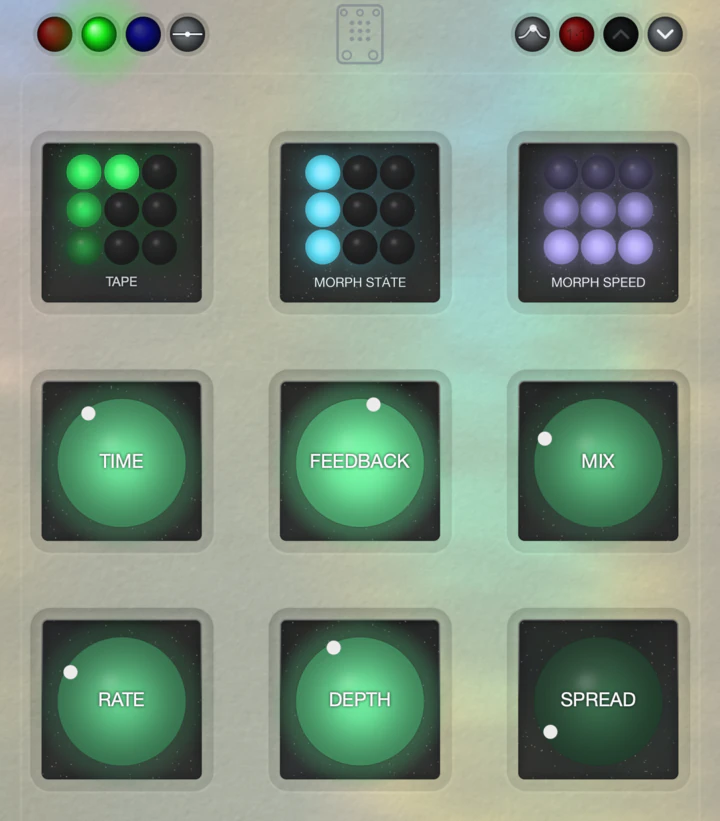
The editor playing tape: its controls by name, TIME, FEEDBACK, MIX, RATE, DEPTH and SPREAD

1Get it, and plug in

Download the editor from the editor page. The first time you open it, your Mac asks whether you trust it: open System Settings, then Privacy & Security, and choose Open Anyway. You only do that once.

Connect the stone's USB-C socket to your computer and open the editor. It shows the stone as it is: the nine lights, the three sounds, every control by name. Plugging in changes nothing on the stone. Turn a knob on the stone and the editor follows; change something in the editor and the stone follows.

Your sound still comes out of the stone's jacks, and the editor stays quiet while the stone is plugged in. You never need the editor to play: everything is on the stone.

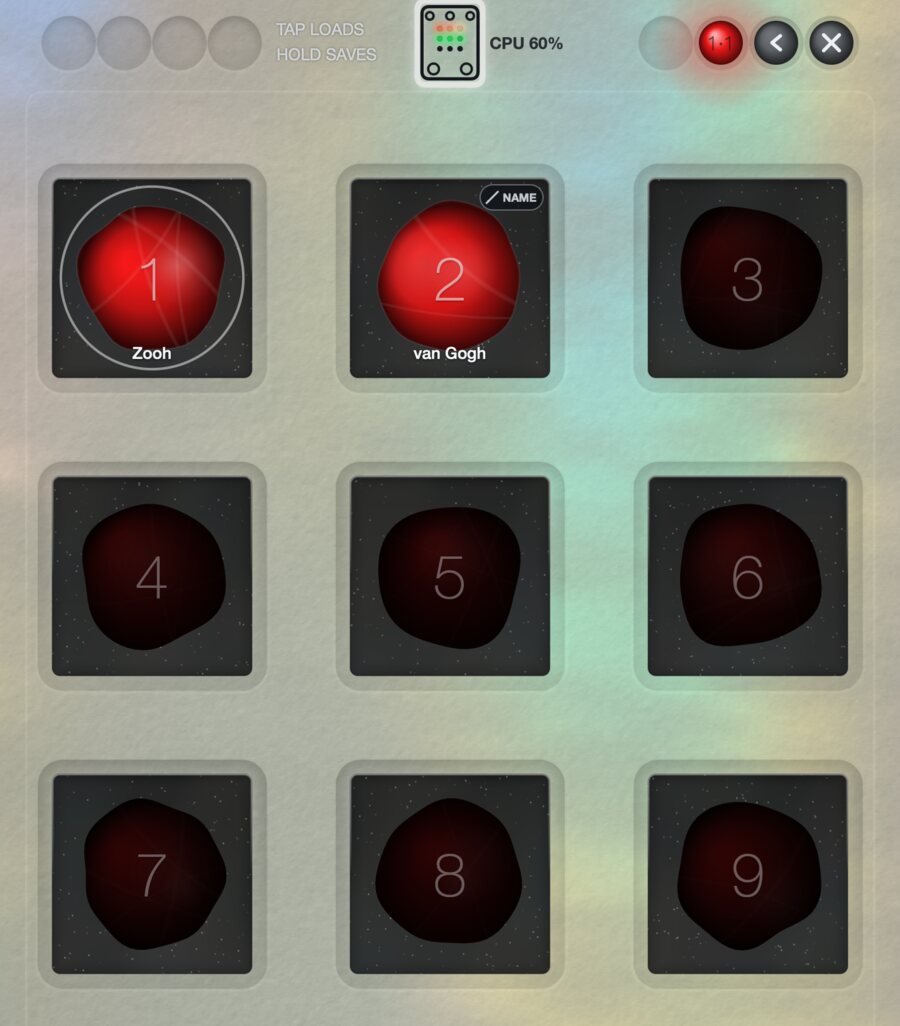
The editor's preset library: bank one's nine slots, two of them named, Zooh and van Gogh

2Name your presets

Save on the stone as always, standing on both feet. To name it, click its name at the top of the editor, type, and press Enter. The name lives on the stone, so it's there next time on any computer.

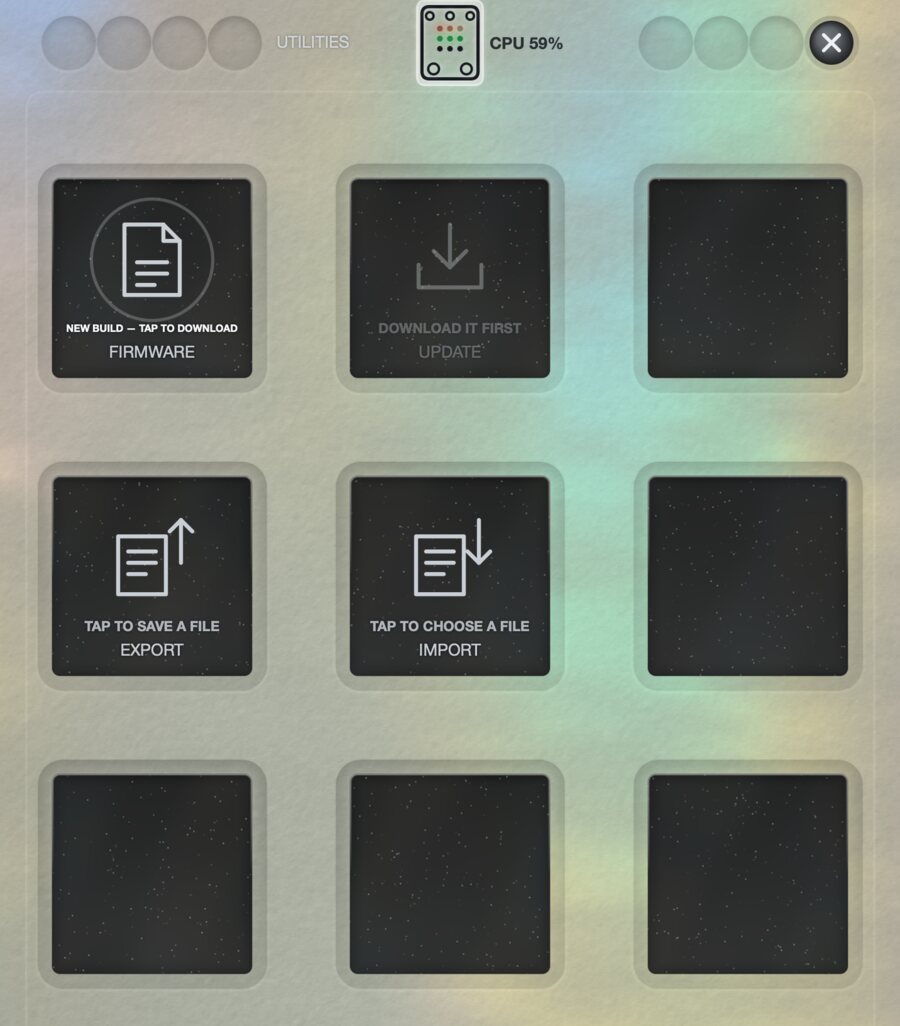
The editor's utilities: FIRMWARE offering a new build, UPDATE waiting for it, EXPORT and IMPORT for the whole library

3The utilities

Click the little drawing of the stone at the top of the editor. Behind it, a row at a time:

  1. FIRMWARE: the stone's updates.
  2. PRESETS: EXPORT PRESETS saves all 81 to one file, and IMPORT PRESETS puts them back, on your stone or a friend's.
  3. HELP: the manual, the sounds, and MIDI.
  4. SETTINGS: OUTPUT for one amp or two, MIDI CHANNEL, and REFERENCE for the tuner.

Click the little stone again to close them.

4Update the stone

When there's a new build, the little stone at the top of the editor breathes. Open the utilities and follow the windows. Each one says what to do next, in these words:

  1. Tap it. The new build comes down from moonstone-fx.com.

  2. Read what it changes while it downloads. Tap anywhere to close it.

  3. Hold it when it breathes, until it starts.

  4. The stone restarts and the build goes in. Leave the cables alone until it's done.

  5. Unplug the power and the USB cable, then plug them both back in.

  6. Green. The stone is running the new build.

Already up to date? Tap UPDATE FIRMWARE to read what's new in the build you have. Every build and what it changed is in the firmware log.

5The editor keeps itself new

When there's a new version of the editor, it says so as it opens. Tap UPDATE and it downloads, installs and opens again by itself, with your stone just as you left it. No internet? It carries on with the version you have.

Recording? The editor also comes as VST3, AU and CLAP plug-ins. With the stone plugged in, your session can record and automate every control on it.

Every move is a card in the manual, drawn in the lights you'll see when you make it.


Get in touch

A question, an idea, something not quite right, or just to say hi. We read every note and write back as soon as we can. If something's gone wrong, tell us what you were doing and what the lights did; if a photo would help, we'll ask for one.